Self Hosted Music Discovery Playlists with ListenBrainz and Navidrome
Introduction
One observation I often see online when self-hosted music libraries are mentioned, is that they don’t offer the ability to generate discovery playlists like the big commercial services do. Spotify offers Discover Weekly, which provides a personalized playlist every week of new songs recommended based on your listening habits.
I wanted to see what a self-hosted equivalent would be like, so I set it up for my music library, and here are the instructions that you can follow for your own.
ListenBrainz provides the necessary data and service to generate a discovery playlist that recommends new songs that you haven’t listened to before, as well as daily and weekly jams playlists based on your recent listening history.
Navidrome is a self-hostable music library which supports generating these playlists for us via a plugin, and can also upload our listening history to ListenBrainz to keep it up to date with our listening habits to improve our recommendations.
To follow this guide, you will need:
- A local music collection with files tagged with MusicBrainz metadata
- A Spotify or Last.fm account to import into ListenBrainz
- Docker and Docker Compose
ListenBrainz
The first thing you’ll need to do is create a MusicBrainz account, visit their Create an account page. You will need to enter a username and password, an email is optional.
Next, we need to seed our listening history in order to have something to generate recommendations on. ListenBrainz achieves this by ingesting data exports from services like Spotify and Last.fm. Visit Import your listening history in your account settings, and follow the instructions for the service that you use.
Now that you have some listening history, we also need to signal to ListenBrainz that we want to have playlists generated for us. The way to do this is to follow the user troi-bot on the ListenBrainz website, visit troi-bot, and click the profile icon with the plus located on the right sidebar to follow the user.
Playlists are generated weekly on a Monday morning based on your local timezone, so it may take a while before you see these playlists in your recommendations.
Navidrome
Now that we have some recommendations, we need to generate them as playlists in Navidrome. We also want to keep ListenBrainz up to date with our listening habits to improve the recommendations over time.
Installation
We will be installing Navidrome, using Docker for brevity, but this is not a requirement, and you are free to use any of the installation methods documented on the project website.
In a new directory, create the file compose.yml with the following contents:
services:
  navidrome:
    image: deluan/navidrome:latest
    user: 1000:1000
    ports:
      - '4533:4533'
    environment:
      ND_CONFIGFILE: /path/to/data/navidrome.toml
    volumes:
      - '/path/to/data:/data'
      - '/path/to/music:/music:ro'
Start up Navidrome by running docker compose up -d.
Visit Navidrome in your browser to complete the setup. You need to enter a username and password for the initial account.
Scrobble listening history
We also want to keep ListenBrainz up to date with the songs that we listen to within Navidrome. This can be done natively by Navidrome, all it needs is a token which will authenticate you with ListenBrainz. Visit your personal settings and enable Scrobble to ListenBrainz. A modal will appear prompting you to enter your ListenBrainz user token, along with a link to where it is located on the ListenBrainz website. Copy the token into the modal and save it in Navidrome.
Installing the ListenBrainz plugin
To automatically generate our playlists within Navidrome, we will use the navidrome-listenbrainz-daily-playlist plugin. We need to download and install the plugin from the GitHub repository into Navidrome.
Download the latest release
listenbrainz-daily-playlist.ndp file and copy it into your /data/plugins directory.
Run the following command to install the plugin into Navidrome.
docker compose exec navidrome /app/navidrome plugin install /data/plugins/listenbrainz-daily-playlist.ndp
Next, in your /data directory, create the file navidrome.toml with the following contents. This will enable plugins,
and configure the ListenBrainz daily playlist plugin to generate daily and weekly jam playlists, and a weekly
exploration playlist.
[Plugins]
Enabled = true

[PluginConfig.listenbrainz-daily-playlist]
Split = ";"
Schedule = "@every 24h"
Sources = "daily-jams;weekly-jams;weekly-exploration"
"Sources[0]" = "ListenBrainz Daily Jams"
"Sources[1]" = "ListenBrainz Weekly Jams"
"Sources[2]" = "ListenBrainz Weekly Exploration"
Users = "<navidrome username>"
"Users[0]" = "<listenbrainz username>"
We’ll restart Navidrome to pick up the new configuration, and it will generate the playlists.
You can verify that the plugin is installed and generating playlists by checking the Navidrome logs. It’s possible that the playlists do not appear in Navidrome, which means that you do not have the recommended songs in your library.
[...] msg="[LBZ Playlist Fetcher]Missing or outdated playlists, fetching on initial sync"
[...] msg="[LBZ Playlist Fetcher]Successfully processed playlist ListenBrainz Daily Jams for user <navidrome username>"
[...] msg="[LBZ Playlist Fetcher]Successfully processed playlist ListenBrainz Weekly Jams for user <navidrome username>"
[...] msg="[LBZ Playlist Fetcher]Successfully processed playlist ListenBrainz Weekly Exploration for user <navidrome username>"
[...] msg="[LBZ Playlist Fetcher]init success"
Visit Playlists in Navidrome to see your generated playlists.
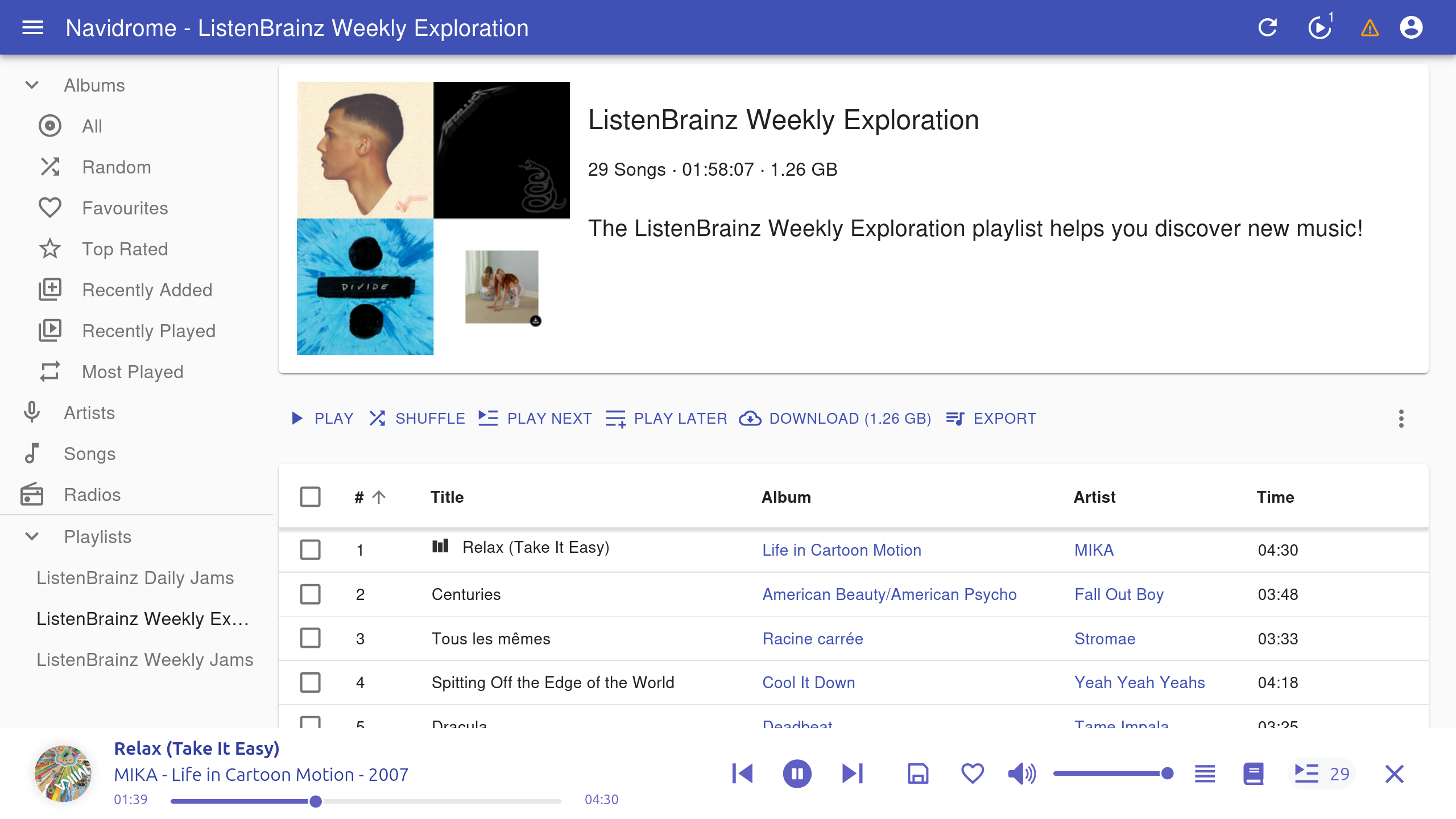
How does it do?
Overall, I’m impressed with the generated playlists, it has offered me a similar experience to Spotify with its recommendations. It’s an automatic solution that generates new playlists for me without any additional effort on my part.
One downside that I’ve experienced is when ListenBrainz recommends songs that are not in my library. It isn’t aware of what I have in my local library, so if I don’t happen to have some of the songs then the playlist is shorter than usual. This can be avoided when using Troi, where it will continuously search for songs until the playlist reaches the desired length, but that requires running the tool manually.
Hopefully I’ve shown that it is possible to get a discover weekly playlist with a self-hosted music library, and that you’ll give it a try.